A labour rate calculator for plumbers turns your own wages, overhead, and billable hours into an hourly rate that covers your costs. Many plumbing shops set their hourly rate by checking what competitors charge. If the shop across town charges $95 an hour, matching it might seem reasonable. But that rate reflects their wages, trucks, and overhead, which may be very different from yours.
This guide walks through the free labour rate calculator with a sample plumbing business. You’ll see what each input means, how the calculator works out the rate, and how to use the result. The example is illustrative, but the calculator uses the same math with your own figures.
What does the labour rate calculator for plumbers need?
Six inputs. Each can affect your rate significantly, so it’s worth checking where your numbers come from before entering them.
- Hourly wage. What you pay the tech per hour before additional employment costs. If you’re an owner-operator, use what you’d pay someone else to do your work, rather than whatever remains at the end of the month.
- Employer burden (%). Costs on top of wages, including CPP and EI contributions, WSIB or workers’ comp premiums, vacation pay, stat holidays, and benefits. In Canada, this commonly falls between 18% and 28% of wages. Check your payroll summary for your actual figure. Current CPP and EI premium rates are published by the Canada Revenue Agencyy.
- Paid hours per year. A full-time tech is paid for about 2,080 hours a year (40 hours × 52 weeks), including time spent on work that can’t be billed.
- Utilization (%). The percentage of paid hours you can actually bill to customers. This is easy to overestimate in plumbing. Driving between calls, supply-house runs, callbacks, quoting, and paperwork all take paid time. A busy residential tech often bills 50% to 65% of paid hours.
- Monthly overhead. Costs the business carries whether jobs come in or not, including truck payments, fuel, insurance, shop rent, phones, software, and accounting. If you’re calculating one tech’s rate, enter that tech’s share.
- Target profit (%). The margin you want after covering all costs. The calculator divides by (1 − profit%), so a 15% target means profit represents 15% of the final rate, rather than a 15% markup on cost.
The worked example: a journeyman plumber billing $95 an hour
Say you own a small residential plumbing shop with one journeyman. You currently charge $95 an hour because that’s roughly what other shops in your area charge. Here’s how the costs break down: The table below lists the six inputs the labour rate calculator for plumbers uses for this example.
| Input | Value | Where it comes from |
|---|---|---|
| Hourly wage | $38.00 | Journeyman rate on payroll |
| Employer burden | 22% | CPP, EI, WSIB, vacation pay, benefits |
| Paid hours / year | 2,080 | Full-time, 40 hrs × 52 weeks |
| Utilization | 55% | Drive time, callbacks, quoting, parts runs |
| Monthly overhead (his share) | $1,900 | Truck, fuel, insurance, rent share, software, phone |
| Target profit | 15% | Margin on the final rate |
Enter those figures into the labour rate calculator and here’s how the math works out:
- Annual pay: $38.00 × 2,080 = $79,040
- Employer burden: $79,040 × 22% = $17,388.80, bringing loaded pay to $96,428.80
- Annual overhead: $1,900 × 12 = $22,800
- Annual loaded cost: $96,428.80 + $22,800 = $119,228.80
- Billable hours: 2,080 × 55% = 1,144 hours
- Loaded cost per paid hour: $119,228.80 ÷ 2,080 = $57.32
- Break-even billable rate: $119,228.80 ÷ 1,144 = $104.22/hr
- Rate with 15% profit: $104.22 ÷ 0.85 = $122.61/hr
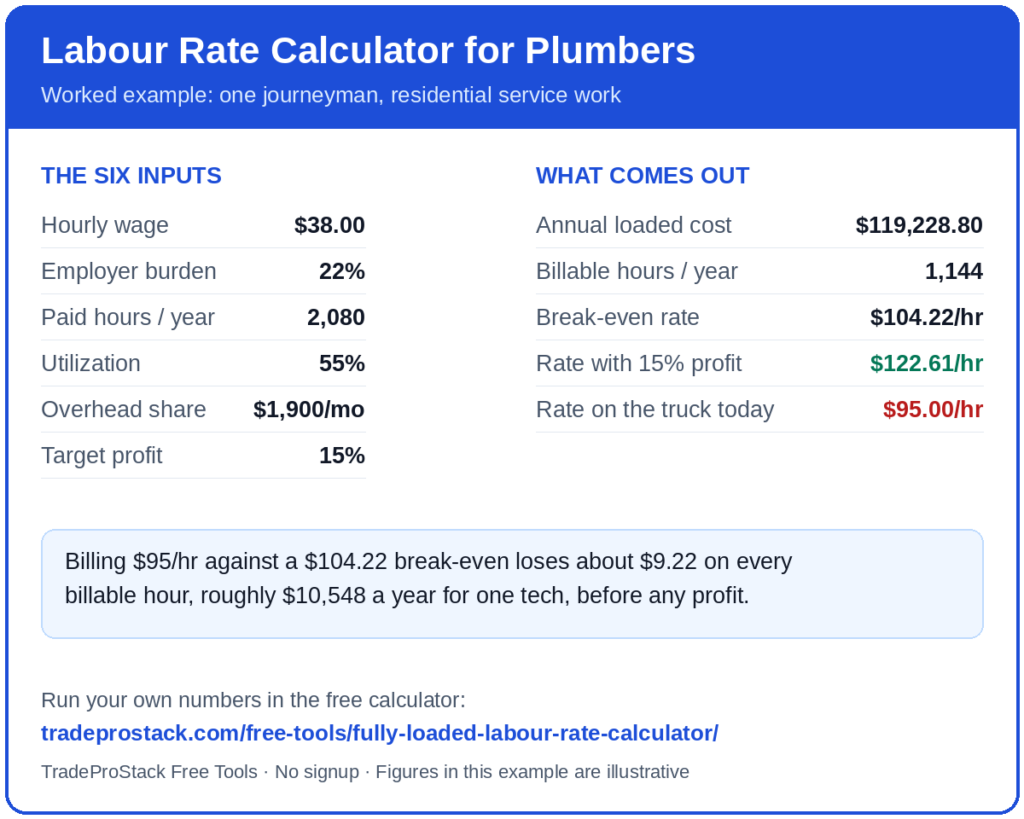
Now compare that with the $95 rate you’re charging. Your break-even rate is $104.22. At $95 an hour, this tech loses about $9.22 per billable hour, or roughly $10,548 a year, before accounting for profit. You can have a full schedule and still struggle to build cash reserves. That’s what happens when your rate doesn’t cover your actual costs.
Run your own numbers
Enter the same six inputs to see your break-even rate and your rate with profit, including the calculations behind each result. Free to use, with no signup.
Why does utilization move the rate more than anything else?
Keep the example’s costs the same, but increase utilization from 55% to 65% through better routing, fewer supply-house trips, and better-stocked trucks. Billable hours rise from 1,144 to 1,352. Break-even drops from $104.22 to $88.19, while the rate with 15% profit falls from $122.61 to $103.75.
That’s a $19 difference in the required rate from a 10-point improvement in utilization, without cutting wages or reducing insurance costs. But your utilization figure needs to reflect a typical year. If you enter 70% because August was busy, you may end up pricing the entire year around hours you won’t bill in February. To check your actual utilization, use the technician utilization calculator, which calculates it from paid and billable hours.
What should a plumber do with the result?
Set the shop rate from your break-even, not the market. Your calculated rate with profit gives you a starting point for pricing. If it’s well above competing shops, review your costs and utilization. Matching a competitor’s lower rate won’t help if you’re losing money on every billable hour. More work at that rate only increases the loss.
Feed it into flat-rate pricing. If you quote jobs at a flat rate, use your calculated labour rate to build the labour portion of each task price. A four-hour job priced using a $95 labour rate when your break-even is $104 understates the quote by about $37 before parts. The labour cost needs to be accurate when you prepare the estimate. That’s also the principle covered in billing from the driveway.
Re-run it when the inputs change. Wage increases, additional trucks, higher rent, and new employees can all change your required rate. Recalculate at least twice a year and whenever a tech receives a raise.
Put the rate where the quotes are built. Disclosure: TradeProStack is reader-supported. If you buy through an affiliate link on this page, we may earn a commission at no extra cost to you, and placement never changes our reviews or scores. Whatever quoting tool you use, the labour rate in it should reflect your calculation rather than a default setting. In Jobber, for example, the rate you set on products and services is what every quote pulls from. Update that rate to apply it to future estimates. Once the rate is in your quoting tool, the quotes it produces still have to be invoiced and tracked. If you are weighing an invoice app against full accounting software, our comparison for plumbers walks through that decision.
What mistakes do plumbers make with each input?
- Using take-home pay as the wage. Enter gross wages. The calculator adds employer burden separately.
- Guessing burden at 10%. Check an actual payroll month. Add CPP, EI, WSIB, vacation pay, and benefits, then compare the total with gross wages. The full cost can be higher than expected.
- Counting only wrench time as paid hours. Use all 2,080 paid hours. Non-billable time belongs in the utilization calculation.
- Optimistic utilization. Review last month’s invoices, total the billed hours, and divide by paid hours. Use that figure instead of guessing.
- Forgetting the owner’s own labour. If you work on the tools, account for your time too. Use the wage you’d pay someone to replace you.
- Treating the output as a quote. The result gives you a labour rate to use when pricing work. Individual quotes still need to account for parts, permits, and other job-specific costs.
Common questions
Should every tech in the shop have the same rate?
Not necessarily. A master plumber and a second-year apprentice have different wages and employer costs, so their break-even rates will differ. Some shops use a blended rate for simplicity. Calculate both rates first so you know what that blended rate needs to cover.
Does this replace flat-rate pricing?
No. The calculated labour rate is an input for flat-rate pricing. Task prices use expected hours × your labour rate, plus parts and markup. If the labour rate in your pricing book is outdated, your task prices may be too.
What if my calculated rate is way above my market?
Review the inputs, particularly utilization and overhead. Better routing, properly stocked trucks, and fewer callbacks may help improve billable hours. You can also review fixed costs. Charging below break-even to match competitors means absorbing a loss on the work.
How often should I recalculate?
At least twice a year and whenever wages change. Review it when other costs shift, too. Insurance renewals, new truck payments, and slower months can all affect the rate you need to charge. Re-running the labour rate calculator for plumbers takes a minute, so there is no reason to let a stale rate ride.
The short version
Copying a competitor’s labour rate doesn’t tell you whether it covers your costs. Using six inputs, wage, burden, paid hours, utilization, overhead, and target profit, you can calculate your break-even rate and the rate needed to reach your target margin. In this example, the difference between the $95 hourly charge and the $104.22 break-even rate amounts to about $10,548 a year for one tech. Enter your own payroll and overhead figures into the labour rate calculator for plumbers to see where your rate stands. You’ll find more free pricing and quoting calculators on the free tools hub.